Cloud Computing Overview & Cloud-Native Technologies
1. Introduction to Cloud Computing
Cloud computing provides resources like servers, storage, networking, and software over a network, allowing users to access them anytime, anywhere, as needed.
- Data migration is often required when moving existing systems to the cloud.
1.1 Virtualization vs Cloud
| Virtualization | Cloud |
|---|---|
| Divides one physical resource into multiple isolated environments for independent workloads. | Delivers IT resources as services over a network. |
1.2 Key Characteristics of Cloud
- On-Demand Self-Service
- Broad Network Access
- Rapid Elasticity & Scalability
- Measured Service (Pay-as-you-go)
1.3 On-Premises vs Cloud
| On-Premises | Cloud | |
|---|---|---|
| Cost | Resources are often underutilized outside peak times. | May involve upfront costs but offers long-term savings. |
| Flexibility | Hard to scale quickly. | Easily scalable up or down as needed. |
| Availability | Requires redundancy and backups for reliability. | High reliability with providers publishing SLAs (Service Level Agreements). |
| Deployment Speed | Time-consuming planning and setup. | Rapid deployment with ready-to-use infrastructure. |
2. Cloud Service Models
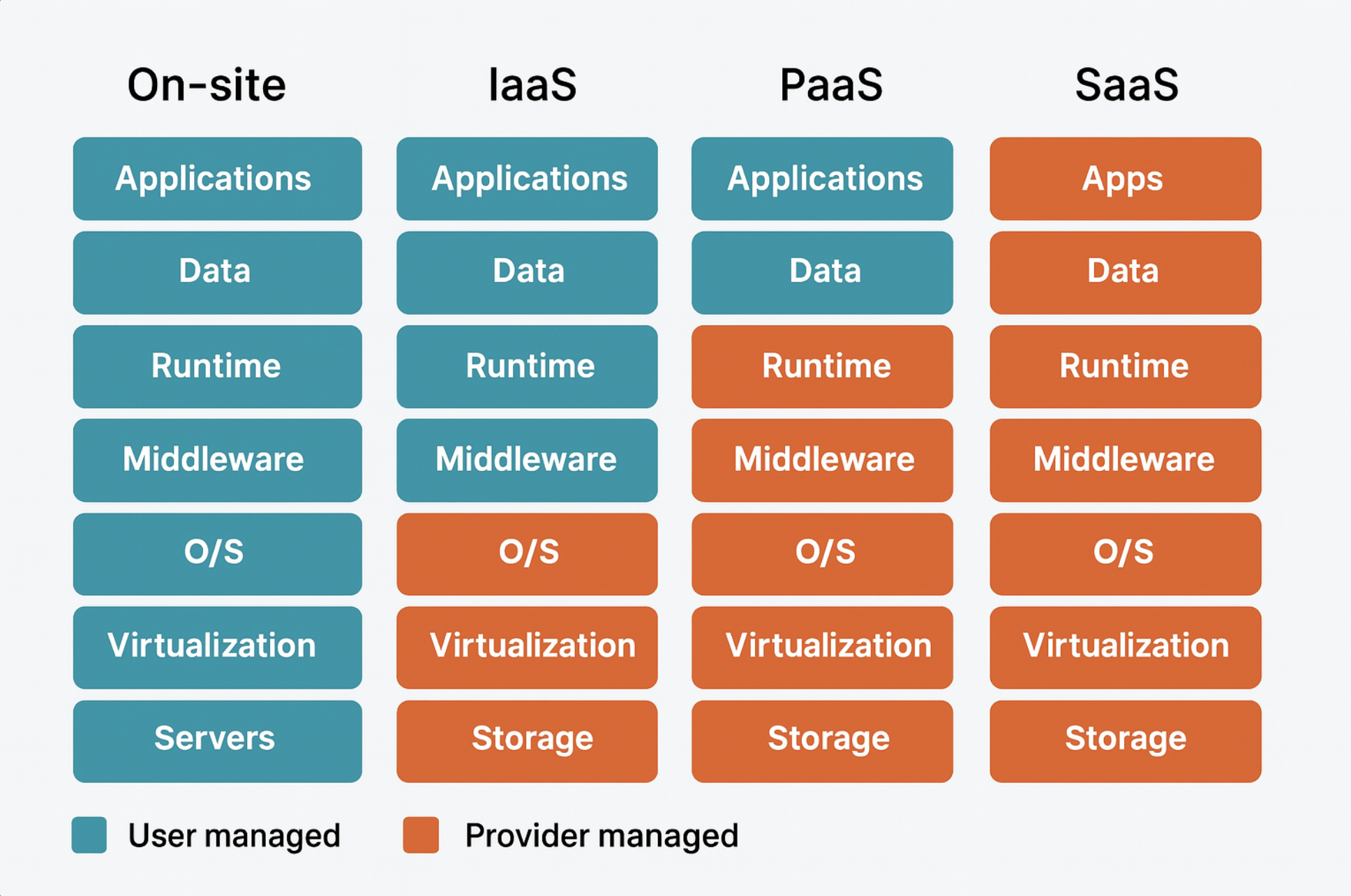
| IaaS (Infrastructure as a Service) | PaaS (Platform as a Service) | SaaS (Software as a Service) |
|---|---|---|
| Provides computing resources like servers and storage. | Offers platforms for developing and deploying applications. | Delivers software applications over the internet. |
- DaaS (Desktop as a Service): Provides desktop environments via the cloud.
- XaaS (Everything as a Service): A broad concept where virtually everything is offered as a service.
3. Cloud Deployment Models
- Public Cloud: Shared infrastructure accessible by the general public.
- Private Cloud: Exclusive cloud infrastructure for a single organization.
- Multi-Cloud: Combines multiple public clouds or public + private clouds.
- Community Cloud: Shared by several organizations with common interests.
- Edge Cloud: Processes data close to where it’s generated.
- Hybrid Cloud: Mix of public and private cloud environments.
4. Core Cloud Services and Concepts
4.1 Virtual Server Services
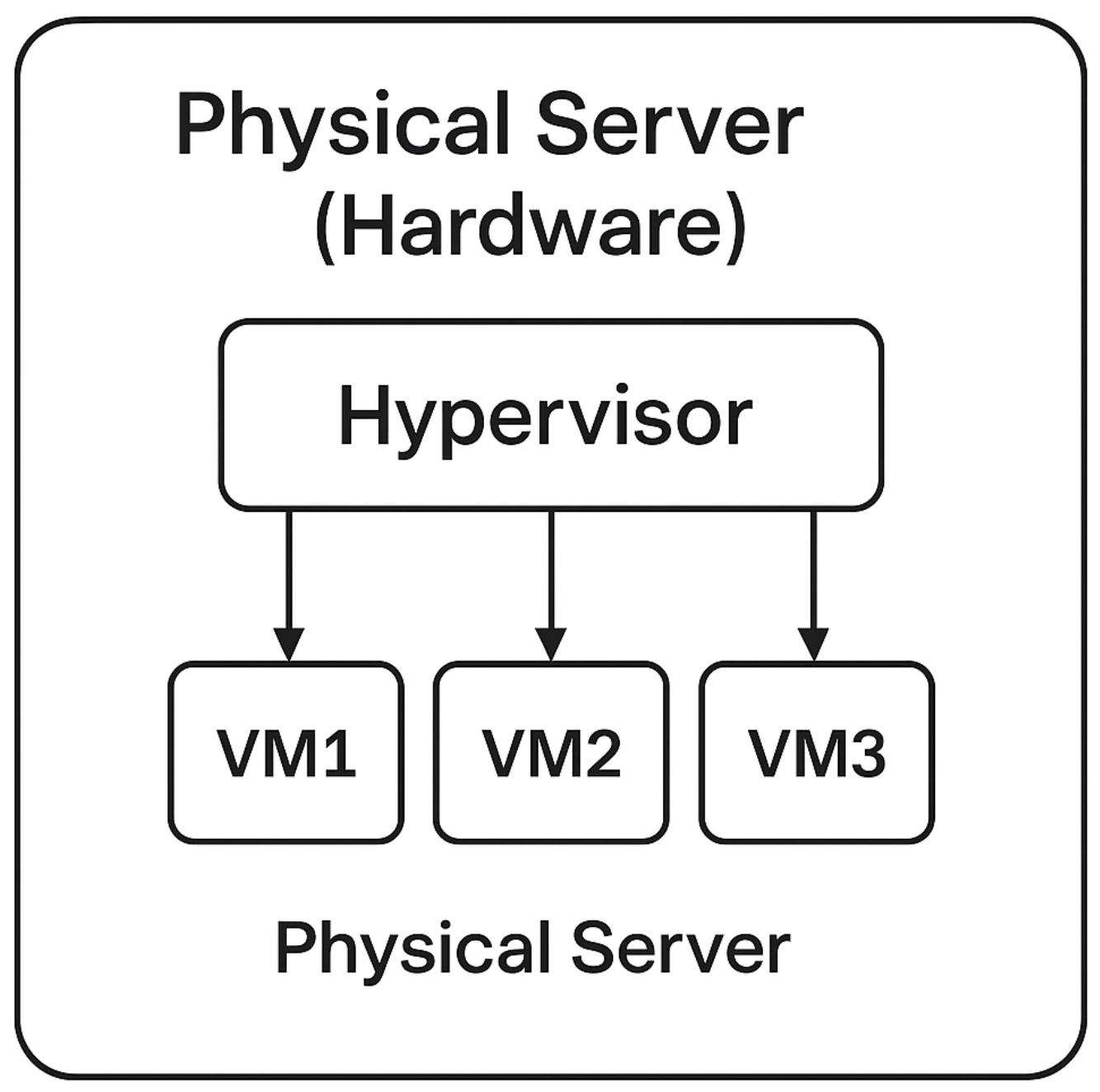
- Virtual servers act like independent machines but run as software-based virtual instances on physical hardware.
- A hypervisor manages hardware resources to create and run virtual machines (VMs).
4.2 Key Cloud Concepts
- Data Center: Facilities housing many servers connected by high-speed networks.
- Region: Geographical location of data centers.
- Availability Zone: A single data center; multiple zones exist in one region.
- Scale Out/In: Horizontal scaling (adding/removing servers).
- Scale Up/Down: Vertical scaling (changing specs of a single server).
4.3 Storage Types
- File Storage: Hierarchical structure with folders and files.
- Block Storage: Stores data in blocks; ideal for high-performance workloads like databases.
- Object Storage: Stores data as objects with unique IDs and metadata; excellent for unstructured data and scalability.
5. Technologies Enabling Cloud Computing
Cloud services, especially IaaS, rely on virtualization across servers, networks, and storage.
5.1 Types of Virtualization
| Type | Description |
|---|---|
| Hypervisor-based Virtualization | Hypervisor runs directly on hardware without a host OS. |
| Host OS-based Virtualization | Hypervisor runs as software on top of a host OS. |
| Container Virtualization | Divides a single OS into isolated environments for lightweight app deployment. |
| Feature | Hypervisor-based | Host OS-based | Container Virtualization |
|---|---|---|---|
| Host OS Needed | No | Yes | Yes |
| OS Installation | Each VM runs its own OS | Each VM runs its own OS | One OS shared among containers |
| Speed | Fast | Slower | Very fast |
| Resource Efficiency | Good | Lower | Very high |
| Isolation Level | Very high | High | Lower (shares kernel) |
| Use Cases | Data centers, enterprise virtualization | Personal testing, dev environments | Microservices, DevOps |
5.2 Other Key Technologies
- OpenStack: Open-source cloud infrastructure management platform, providing IaaS capabilities for compute, storage, and networking.
- HCI (Hyper-Converged Infrastructure): Integrates compute, storage, and virtualization into a single platform.
- PaaS Enabling Tech:
- Docker: Creates and runs containers.
- Container Orchestration: Tools like Kubernetes manage many containers automatically.
6. Cloud-Native Technologies
- Containers: Package apps with dependencies for consistent execution.
- Container Orchestration: Manages large numbers of containers across clusters (e.g., Kubernetes).
- DevOps: Bridges development and operations for faster, automated workflows.
- CI/CD: Automates integration, testing, and deployment processes.
- MSA (Microservices Architecture): Breaks large applications into smaller, independent services.
7. Cloud Native Architectures
7.1 Monolith vs. Microservices
| Aspect | Monolith | Microservices |
|---|---|---|
| Structure | Single large app | Many small independent services |
| Deployment | Entire app redeployed | Independent deployment of services |
| Speed | Fast at first, slower as complexity grows | Faster due to team autonomy |
| Failure Impact | One failure affects the whole system | Failures isolated to individual services |
| Tech Stack | Unified across the app | Services can use different tech stacks |
| Testing | Easier integrated testing | Requires contract testing between services |
| Complexity | Simpler initially | Higher due to distributed systems |
7.2 Kubernetes
Kubernetes is a powerful container orchestration platform that provides:
- Automated Deployment
- Scaling and Load Balancing
- Self-Healing (Automatic Recovery)
- Rolling Updates without downtime
7.3 DevOps + CI/CD
Combining DevOps practices with CI/CD pipelines enables rapid, automated, and reliable software delivery in cloud-native environments.
⭐ Summary
Cloud computing makes IT resources accessible on demand, offering flexibility, scalability, and cost efficiency. Modern architectures like microservices, coupled with technologies like Kubernetes, empower organizations to innovate rapidly and operate at scale.
This post is licensed under CC BY 4.0 by the author.